


How to download and get your license
1. The licence cost for distant students is normally paid for (amount may vary) by the university. To make it work you need a special discount code from your teacher or from the University secretariat.
2. Download and install the program:

3. From inside the program, go to the license window and order your personal license following the procedure described below. Please observe the following details:
- Correct spelling of your DISCOUNT CODE is required
- Choose the most advanced program version (12 month CONSULTANT)
- Fill in your name, university, email and telephone
1. Fill in the form (don´t bother about the "standard"-logo that is shown at this point):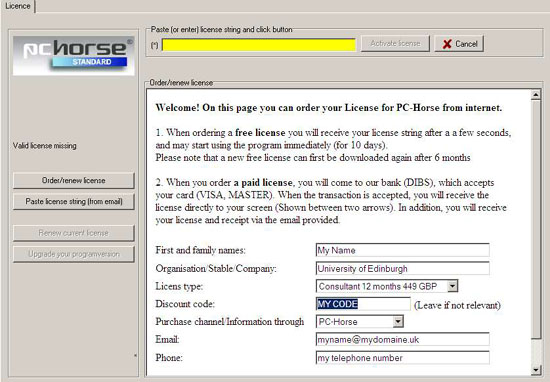
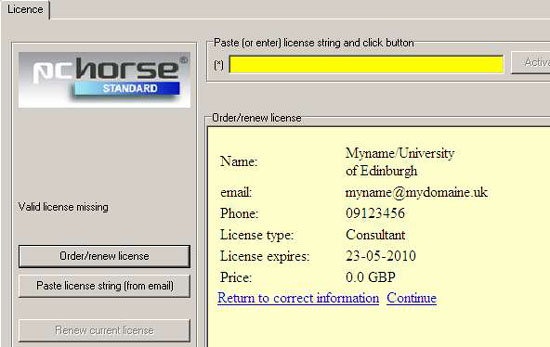
2. Check . Is the price 0.0 GBP? if not, something´s wrong with the discount code:
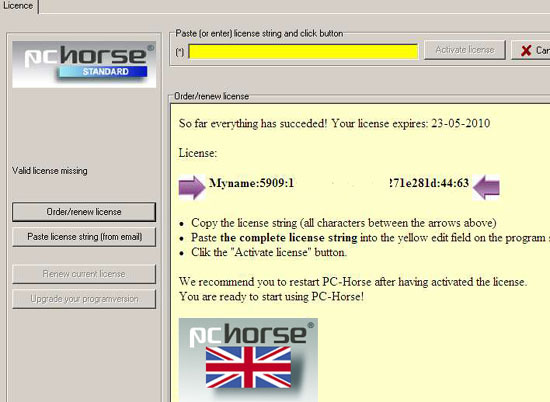
3. Your license string appears in the window
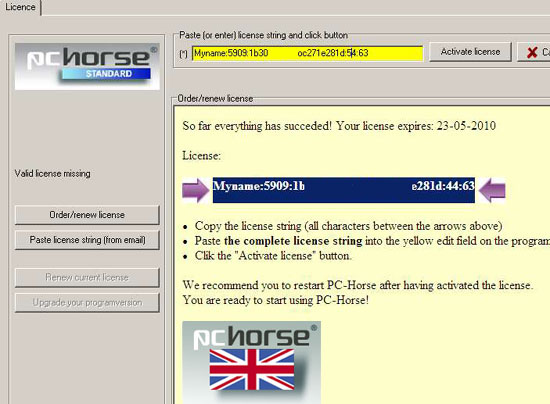
4. Copy the license string and paste it into the yellow field. Activate, restart and your PC-Horse is ready to use.
5. Study the manual carefully. You will find it here. Take a look in our instructive films here.
We hope you enjoy working with PC-Horse