We strongly recommended that you use a "template or model" feed when you create new feeds of your own!
By using template feeds you will ensure that all nutrients will be included in the analysis tables, even when your feed analysis contains a limited set of nutrients.
Follow this path to insert a new feed in your feed list (for example, a new hay)
- Open the feed list in which you want the feed to be stored
- Give the feed a name of your choice
- Select a feed type from the list
- Click the "Template feed" button
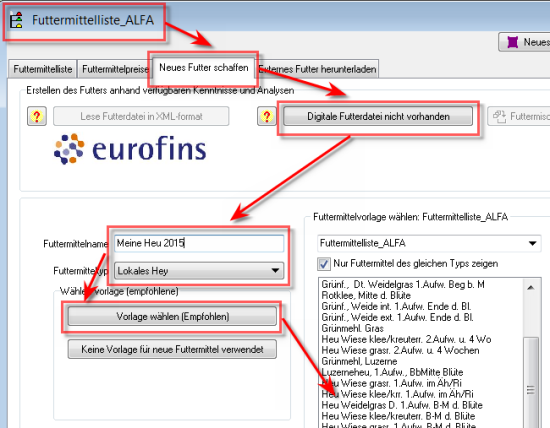
- Select the feed list you want to take the model feed from
- Double-click the feed in the list that you want to use as template (choose a feed with properties as close as possible to the new feed
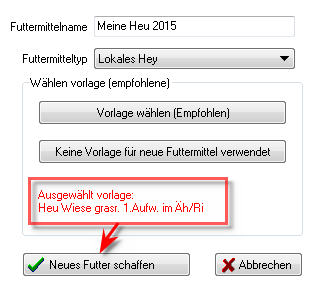
- PC-Horse confirms your choice (red text)
- Click: "Neues Futter Schaffen"
- You are now transferred to the screen for editing feeds.
- In this illustration all values emerge from the template feed - the values are yellow
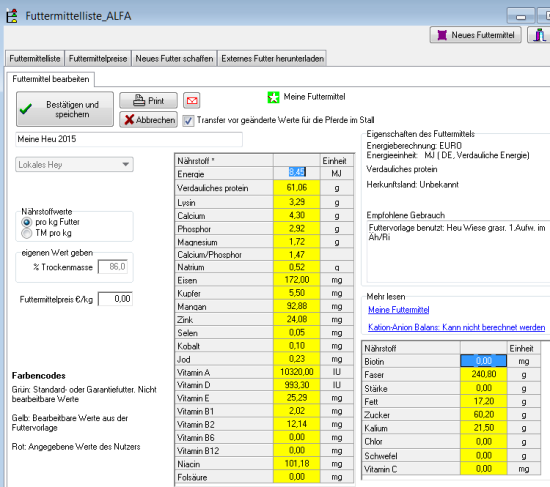
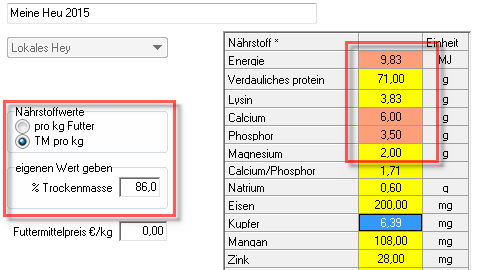
Change nutrient concentrations according to your own analyses in the yellow fields in the table. Standard (template feed) values will be used where you do not have your own analyses. Please observe that PC-Horse formulates all concentrations of nutrients as per kg of feed. Some analytical results from laboratories, and even feed declarations, are given as a percentage value. Per cent means per 100 g of feed, not gram per kg of feed. If for example the content of a nutrient like calcium is given as a percentage, i.e. 2.3%, you should enter a value of 23 g calcium per kg of feed.
Don't forget to adjust the dry matter percentage before changing to per kg values if your analyses are given as per kg of dry matter!
It is a good idea to put in the price per kg now as well.